






.png)
Mason Johnson
June 10, 2026
What’s New in May 2026
Put Jasper where your marketing work already happens.
Marketing work does not happen in one place. Campaign context lives in Slack threads. Source material sits in SharePoint and shared drives. Production moves through Workfront. Admins and IT teams help decide which tools are available, trusted, and ready for the broader team.
This month’s Jasper release brings AI deeper into those everyday systems, so marketers can move from conversation to creation to execution with less switching, less copying, and fewer workflow blockers.
Create in Slack, sync from SharePoint, and export to Workfront
Marketing teams move faster when AI fits into the systems where work already happens. This month, Jasper is making integrations more useful, more discoverable, and easier to trust—helping teams connect approved knowledge, collaborate on drafts, and move content into active campaign workflows without unnecessary handoffs.
Create with Jasper directly inside Slack
The Jasper Slack Agent brings AI-assisted content creation into the conversations where campaign work is already happening. Teams can @mention Jasper in a Slack channel or thread, or work with Jasper in a direct message, to brainstorm, summarize, rewrite, expand, or draft content using Jasper IQ assets and Slack workspace context. The Slack Agent is available for Jasper customers with API access.
With Jasper in Slack, marketers can:
- Turn conversations into first drafts by asking Jasper to summarize a launch thread, create a campaign brief, or draft landing page copy while the context is still fresh.
- Keep quick-turn work on brand with access to Jasper IQ assets like Brand Voice, Knowledge Base, and connected sources directly from Slack.
- Reduce tool-switching by generating social posts, email subject lines, campaign copy, or content rewrites without leaving the channel.
- Collaborate where feedback already happens by iterating on Jasper’s output in the same Slack thread where the team is reviewing the work.
Access the right SharePoint content libraries
For Business accounts using SharePoint, Jasper now supports access to Document Libraries beyond the default library. Teams can choose the right SharePoint Document Library when exporting from Jasper or syncing content into Knowledge Base, with support for navigating nested folders during Knowledge Base sync.
This helps marketers:
- Work from approved source material by connecting Jasper to the libraries where campaign, product, brand, and content documentation already live.
- Keep Knowledge Base syncs more relevant by selecting the right Document Library instead of being limited to a default location.
- Reduce manual file movement when exporting or syncing content between Jasper and SharePoint.
- Better support complex enterprise content structures across teams, regions, brands, or business units.
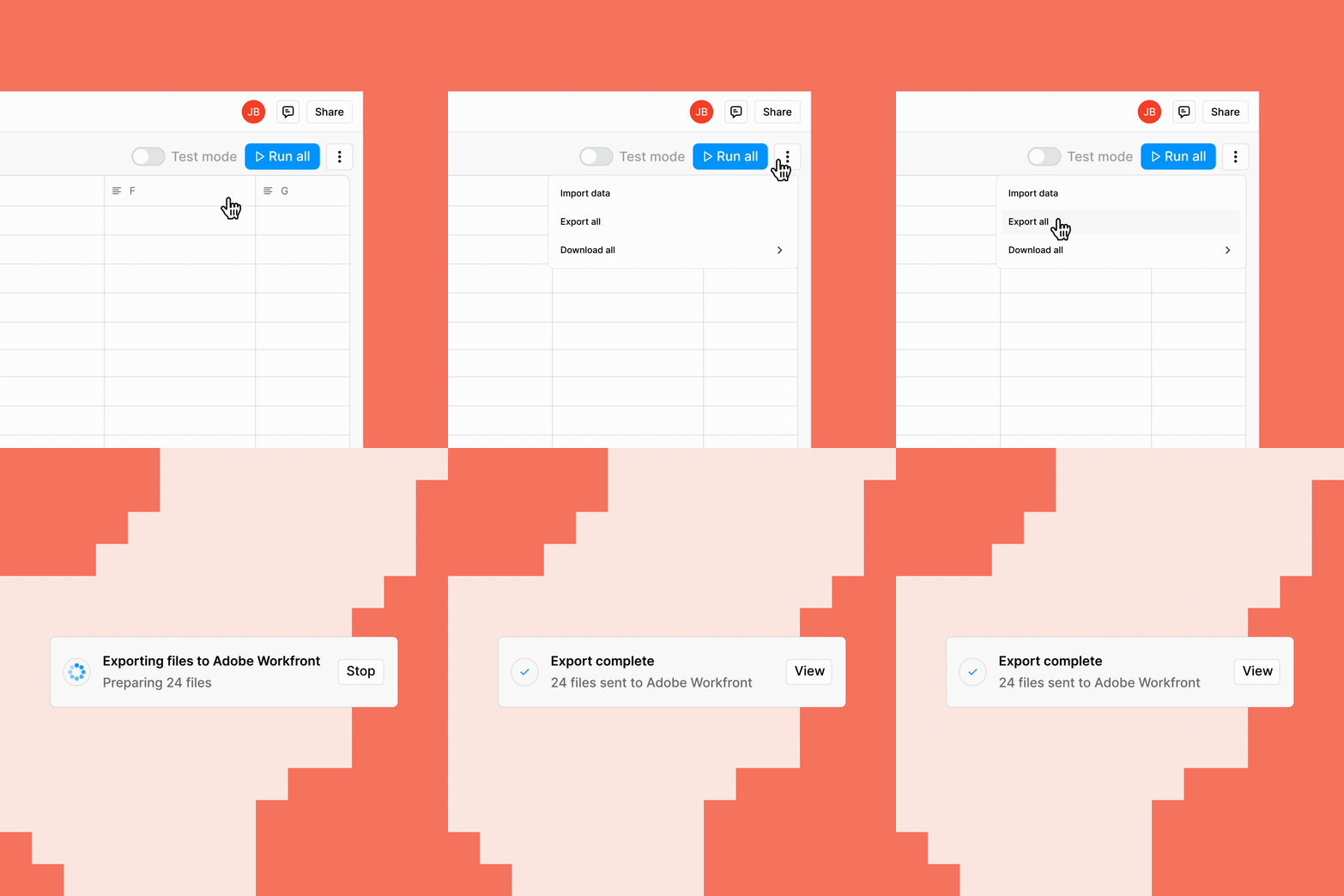
Export to the active Workfront projects that matter
Jasper’s Workfront integration now makes it easier for large teams to find the right active project when exporting content. Jasper filters out inactive system statuses like completed, dead, and rejected projects, and has increased the project pull limit from 100 to 500.
For teams with years of Workfront history, that means:
- Fewer blocked exports when the project you need was previously hard to find.
- Cleaner project lists focused on active work instead of historical clutter.
- A faster handoff from Jasper to campaign execution so teams can move approved content into the right production workflow.
- A better experience for enterprise teams managing hundreds or thousands of projects across brands, regions, and campaigns.
Everything else: Make Jasper easier to set up, run, and scale
Beyond integrations, this month’s updates make Jasper easier to configure, more reliable to run, and better equipped for scaled AI-powered content creation. Teams can get to on-brand generation faster, keep Studio workflows current with less manual maintenance, and gain more visibility into high-volume Grid activity.
- Set up a Style Guide in minutes. Business workspaces can now generate a draft Jasper Style Guide from 1–3 sources, including documents, URLs, or raw text. This gives teams a faster starting point for on-brand generation while still allowing review and refinement before use.
- Keep Studio Agents current automatically. Jasper now automatically selects and updates the best supported model for Studio Agents, reducing the need for teams to manually manage model choices as new models become available.
- Use newly available models in Studio. Anthropic Claude Opus 4.8 and Google Gemini 3.5 Flash are now available.
- See what happened after a Grid run. Grid History gives Business and Pro users a run log for each Grid, including status, execution time, triggering user, source, test or production mode, run details, number of outputs, and duration.
- Explore Jasper’s latest image research release. Jasper publicly released MONET, a deduplicated and recaptioned image-text dataset of roughly 105M samples, along with Nano T2I and supporting research tooling.
Explore this month’s release
Jasper now fits more naturally into the places teams collaborate, store knowledge, manage campaigns, and scale production—so marketers can spend less time moving between systems and more time creating work that is clear, consistent, and on brand.
Jump into Jasper to start using these updates, and explore the Community for detailed guidance on how to put them into practice.

More of the latest & greatest

Governance First: How Financial Services Marketing Teams Scale AI Without Slowing Down Review
Financial services marketers can’t scale personalization, speed, or AI search visibility on review alone. Brand governance has to come first.
October 22, 2026
|
Jessica Kennedy

When AI Gets Your Brand Wrong: The Accuracy Problem Nobody Is Tracking
How to identify inaccuracies in AI-generated answers and improve how AI search engines represent your brand.
October 22, 2026
|
Kurt Lambert

Monitor, Decide, Act, Measure: Where Humans Stay in the Loop on AI Search
A practical framework for using AI agents to manage GEO workflows while keeping marketers in control of key decisions.
October 21, 2026
|
Kurt Lambert