How to Scale Marketing Ebook Creation with Jasper

Ebooks are among the highest-value content assets a marketing team can produce, and one of the hardest to execute at scale. Here's how to build one faster, without sacrificing quality or brand consistency.

Start Free Trial
Get A Demo
Red outline of a document with wavy lines and arrows pointing from a circle to triangles.

IN THIS POST

Jasper handles the research, outlining, writing, and scaling for your marketing Ebooks. Set up your Brand Voice and Knowledge Assets once, and Jasper produces on-brand, research-backed content from the first chapter to the final version, including translations and variants at scale. Here's the process.

Jasper tools you'll use to scale Ebook creation

Canvas is Jasper's main AI-powered writing environment, a brand-aware document editor where Jasper drafts, refines, and iterates on your content. Canvas understands your company, audience, and tone of voice so every chapter is grounded in your brand from the start.

Grid is Jasper's spreadsheet-style workspace for scaling AI content production. Each row is an Ebook, a different market, audience, campaign, or language. Jasper runs your full Ebook workflow across every row simultaneously.

Brand Voice trains on your company's existing content so every output sounds like your brand, not generic AI.

Knowledge Assets let you upload existing research, positioning documents, and talking points so Jasper draws on your actual context and perspective as it writes.

Three agents handle the heavy lifting:

  • Research Agent, Gathers comprehensive topic information, competitive context, and supporting data before a word is written
  • Ebook Outline Agent, Develops a structured, chapter-by-chapter outline from your topic and goals
  • Translation Agent, Translates completed Ebooks into 27 languages with brand-accurate terminology, preserving tone and meaning across every market

The Jasper AI Ebook workflow

Step 1: Set up your context

The difference between generic AI output and content that sounds like your brand comes down to one thing: how well Jasper knows your company before it starts writing. Spend 15 minutes here and it pays off across every asset you produce.

Set up Brand Voice. Paste in examples of your best-performing content, a blog post, a sales page, a newsletter. Jasper analyzes the tone, style, and vocabulary and applies it automatically across your Ebook.

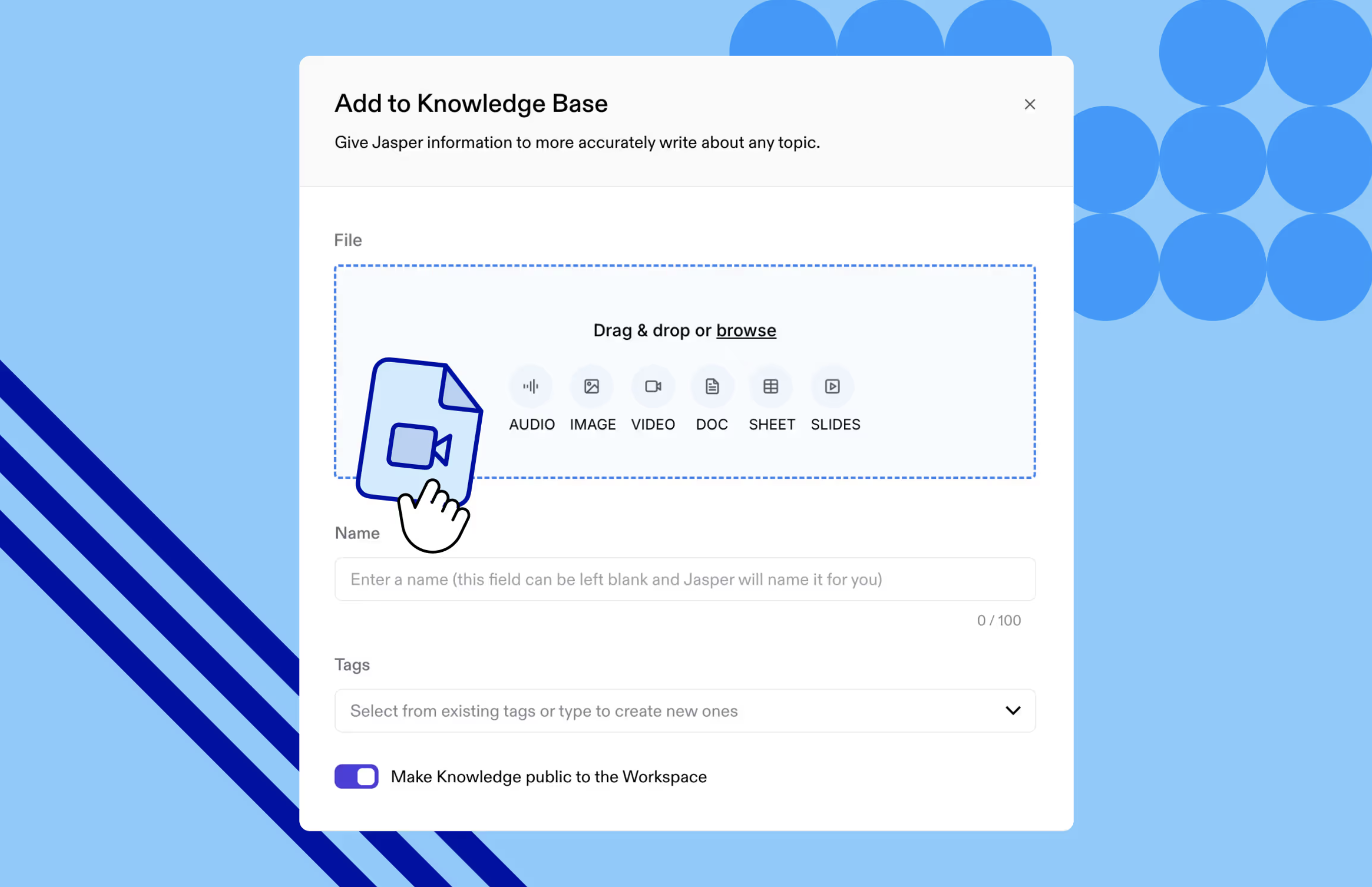
Upload your Knowledge Assets. Have a brief, a positioning document, original research, or talking points the Ebook should draw from? Upload these as Knowledge Assets. Jasper references them throughout the writing process, keeping every output grounded in your actual perspective rather than generic industry takes.

Add to Knowledge Base interface with file upload options for audio, image, video, document, sheet, and slides.
Uploading a knowledge item into Knowledge Base for reference across generations in Jasper

Open Canvas and set your parameters. Start with a simple document that defines who the Ebook is for, what the core argument is, and what you want the reader to do after finishing it. This context shapes every step that follows.

Step 2: Research the topic

Open the Research Agent and give it your Ebook topic, target audience, and any specific questions the content needs to answer. Jasper gathers relevant information, competitive context, and supporting data, producing a comprehensive research foundation so the writing starts from substance, not speculation.

Step 3: Generate your outline

Feed your research into the Ebook Outline Agent along with your core argument and scope. Jasper returns a structured, chapter-by-chapter outline. Review the sequencing, adjust for your narrative arc, and confirm the structure before writing begins.

User interface of an ebook outline tool with context upload, topic input, and a red document icon with shapes.
Using the Ebook Outline Agent in Jasper Canvas to create an outline using your inputs and context

Step 4: Jasper drafts each chapter in Canvas

With your outline confirmed, Jasper works through each chapter in Canvas, drawing on your Brand Voice, Knowledge Assets, and research to write content that is consistent, on-brand, and grounded in your company's actual perspective. You review, refine, and move chapters through Canvas's built-in workflow (Draft, In Review, Completed) without leaving the platform.

Step 5: Scale across markets with Grid

Grid is where one Ebook becomes many. Each row in Grid is a distinct Ebook, a different segment, market, or product line. Configure your agents and context inputs once, and Jasper runs the full workflow across every row. Add a Translation Agent column to produce localized versions in up to 27 languages in the same pass. What takes weeks of manual production runs in hours.

Want to go deeper? Read more about how Grid works.

What's next: from Ebook to content engine

The Ebook is the beginning, not the end.

Once you have a polished draft, Jasper can help you get more mileage out of it. Break chapters into standalone blog posts with the Blog Post Agent. Turn key arguments and statistics into social content with the Social Media Posts Agent. Use the Content Summarizer to condense the full Ebook into a nurture email or executive summary.

Each piece of repurposed content links back to the gated Ebook, extending its reach and compounding the pipeline work it was built to do.

FAQs

Frequently asked questions about Ebook creation in Jasper

Yes, and marketing Ebooks are one of Jasper's strongest use cases. Jasper is designed to excel at creating professional marketing content, including lead magnets like Ebooks, thought leadership pieces that establish authority, sales enablement guides tailored to your audience, and demand generation assets that drive engagement. By integrating your Brand Voice, Knowledge Assets, and a clear brief, Jasper generates research-backed, on-brand chapters that align with your team's unique perspective and expertise. It's best suited for professional marketing content rather than creative works intended for commercial publishing.

Set up Brand Voice before you start writing. Jasper trains on your existing content and applies your company's tone, style, and vocabulary throughout the Ebook automatically. Uploading Knowledge Assets, positioning documents, research briefs, and talking points reinforces this further by grounding every output in your actual perspective.

Yes. Canvas supports collaborative workflows with document statuses (Draft, In Review, Completed) that let writers, editors, and stakeholders move chapters through review together. For teams producing multiple Ebooks or market variants, Grid lets you run the full workflow at scale across as many versions as you need.

A first draft of a five-to-seven chapter Ebook typically comes together in a few hours in Jasper, compared to several weeks with a traditional writing process. Setting up Brand Voice and Knowledge Assets takes about 15 minutes and applies to every future project.

Yes, and it's one of the highest-ROI things you can do with a finished Ebook. Use Jasper's dedicated agents for blog posts, social media content, email sequences, and summaries to turn Ebook chapters into other content types.

Ready to level-up your ebook workflow with agents?

Get A Demo
Four diverse coworkers engaged in a meeting with one standing woman holding a folder, smiling colleagues seated around a table with a laptop and plants.
Greeting card with floral illustrations featuring blue and yellow flowers surrounding the text 'The End'.
https://www.jasper.ai/tools/ebook-creator