





Mason Johnson
November 4, 2026
New in Jasper GEO Hub: Know Where You Stand, Understand What Moved, and Act on It
Jasper now shows how AI search visibility varies by market, what’s behind every score change, and how to act on it with your agents and tools.
From a Single Score to the Full Story of Your AI Search Visibility
Key takeaways
- Jasper now shows where your brand stands in every market: you can assign one of nine regions to any analysis, then compare every brand, product line, and region in one table.
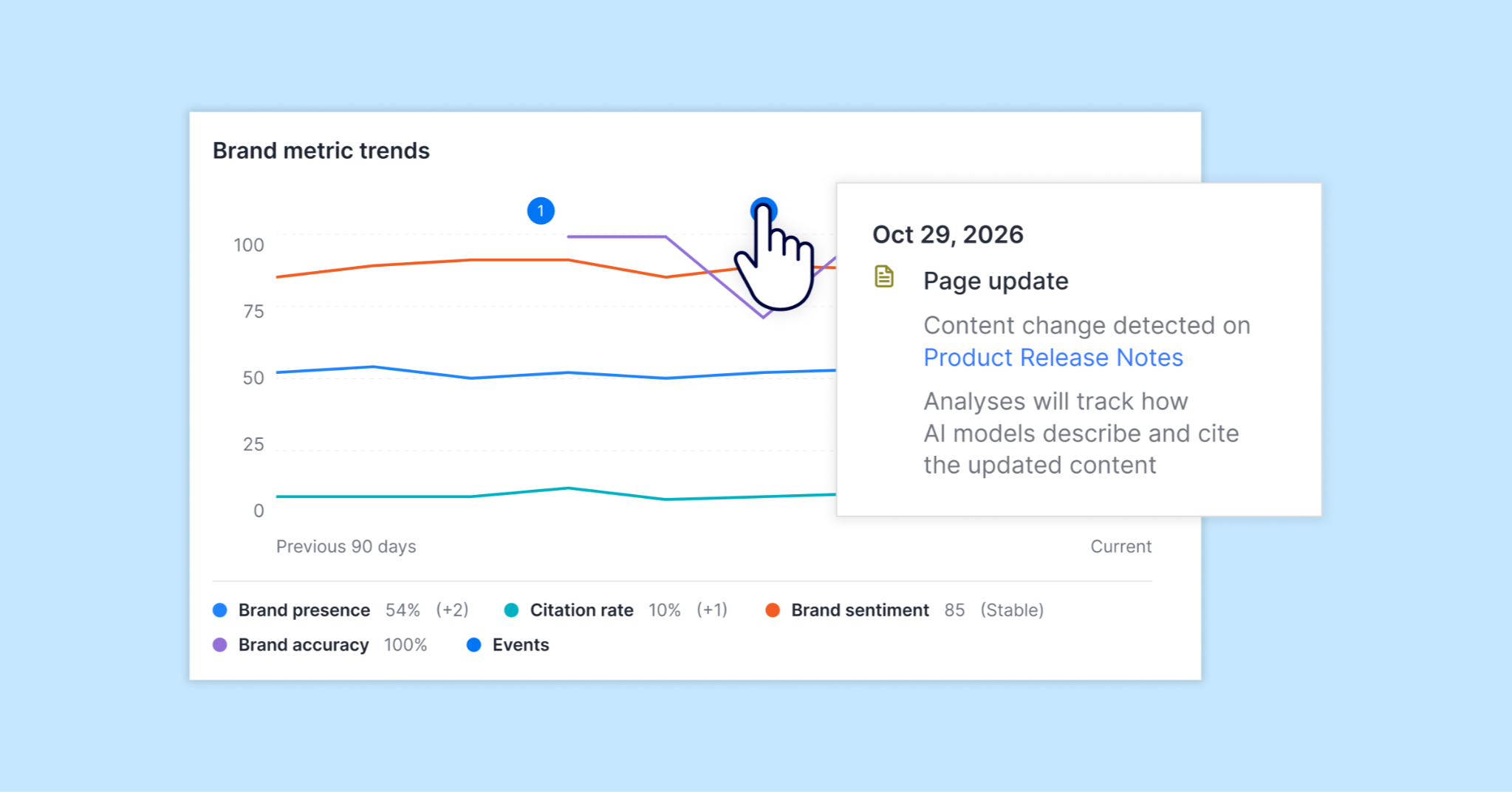
- Key events explain what’s behind a score change, marking model updates, page edits, and analysis changes on your trend chart, so you can tell your team’s impact apart from outside factors.
- GEO insights now carry into the work. The GEO Agent runs your Task Agents, so GEO content follows the rules you’ve already built. The Jasper API and MCP bring GEO data into your own dashboards and AI tools.
A GEO score is a good start. It tells you how often AI search mentions and cites your brand. But the questions that follow are harder. How do we look in the UK compared with the US? Why did our score drop last week? And what should we do about it?
AI search answers change by market, model, and moment, so a single score can’t answer those questions on its own. Teams fill the gaps by hand. They open analyses one by one and stitch results into a spreadsheet before the leadership review. When someone asks what changed, they rebuild the timeline from memory. And by the time they know what to fix, they’re retyping the same content rules into every prompt.
The latest updates to Jasper fill in the rest of the story. See where you stand in every market, understand what moved your score, and act on it with the agents and tools your team already trusts. Less time piecing together what happened. More time improving how AI represents your brand.
Here’s how it works.
Where Does Your Brand Stand in Every Market?
It starts with the question leadership asks first: how are we doing? For a global brand, the answer depends on where the buyer is. Ask an AI assistant for the best business bank, and someone in New York may hear different names than someone in Sydney.
Jasper now lets you assign a region to any GEO analysis. Jasper sends that location context to each AI provider, so the brands that show up, and who leads share of voice, reflect what buyers in that market are likely to see. Your prompts don’t change. Only the location context around them does.
Nine regions are supported at launch:
- United States
- United Kingdom
- Australia
- Canada
- New Zealand
- Ireland
- South Africa
- Hong Kong
- United Arab Emirates
Each analysis tracks one region. To cover several markets, duplicate an analysis and give each copy its own region. Existing analyses can take a region too, straight from settings, without being rebuilt.
Then see everything at once. GEO Hub now opens to All Analyses, a single table of every analysis you run, whether you split them by brand, product line, or region. Each row shows:
- overall score
- mentions
- citation
- sentiment
- share of voice
- location
- which way each score moved since the last run
Filter by location or status to zero in on the markets that need attention. For the leadership update, the summary metrics and Main insights give the full picture from one screen. Main insights calls out your top performer and your biggest drop. No spreadsheet required.
What’s Actually Changing Your AI Search Presence?
Knowing where you stand raises the next question. When a score jumps or drops, what caused it?
That answer used to depend on who remembered what. Maybe your team refreshed a product page. Maybe someone added prompts to the analysis. Or maybe an AI provider switched to a new model that cites sources differently. Each calls for a different response. Without a record, it’s hard to separate your team’s impact from changes outside your control.
Key events close that gap. Every GEO analysis now keeps a running record of what changed and when, shown as markers right on your metric trend chart. Hover over or click a marker to see the details. Events capture four kinds of change:
- Your analysis settings. Prompts, AI providers, or pages added or removed.
- Your pages. Meaningful content updates to the pages you track.
- The AI model. A change to the model Jasper uses to query a provider.
- Scoring. Updates to how GEO scores are calculated.
Events are recorded automatically and never rewritten. The next time someone asks “Why did our score change?”, you have a clear answer instead of a guess.
How Do You Turn GEO Insights Into Action?
Insight only matters if it leads somewhere. Most teams already know what good content looks like for their brand. They’ve built that into Task Agents, with the right structure, compliance requirements, and brand guidance. Acting on GEO shouldn’t mean starting from scratch.
Now the GEO Agent runs your Task Agents. Ask for something specific, like a thought leadership post on AI tools, and it runs the matching agent right away. Give it a broader request, and it suggests options, with your team’s custom agents listed first. If you already know which agent you want, pick it from the Agent Library in chat or @ the agent directly. You can also tell the GEO Agent your preference, and it remembers next time. Either way, GEO-driven content follows the same rules as everything else your team publishes.
GEO data doesn’t have to stay in Jasper, either. The Jasper API and Jasper MCP now return the same analyses, run history, recommendations, and trends you see in the product, key events included.
- Reporting. Pull GEO data into the dashboards and BI tools your team already reports from.
- AI assistants. Connect Jasper MCP to an assistant like Claude or ChatGPT and ask, “What are my top three GEO recommendations?” or “Why did my score change?”
- Automation. Create and manage analyses through the API to fit GEO into your existing workflows.
What Does This Mean for Your GEO Program?
Until now, most GEO programs have run on snapshots. A score comes in, someone screenshots it for the deck, and the team moves on until the next run. That’s enough to prove AI search matters. It isn’t enough to manage it.
These updates turn GEO from a number you report into a program you run. Every market gets its own baseline. Every score change comes with context. And every action runs through the same agents, rules, and tools as the rest of your marketing.
That changes the conversations your team has. The quarterly review stops at “here’s our score” today. It becomes “here’s where we’re winning, where we slipped, why, and what we’ve already shipped to fix it.” Regional teams can work from their own market’s numbers instead of a single global average. And when you update a page, the next run shows whether it helped, with a key event marking the exact moment the change landed.
AI answers increasingly shape which brands buyers consider. The brands that show up won’t be the ones that check their score most often. They’ll be the ones that close the loop fastest.
Frequently Asked Questions (FAQ)
Do I need to update my existing analyses?
No. Existing analyses in Jasper GEO Hub keep running as before. GEO Hub now opens to the All Analyses view, where you can select any analysis to open it. To track a specific market, add a region from an analysis’s settings.
Does setting a region cost extra credits?
No. Setting a region doesn’t change the price of a GEO Hub analysis. Changing the region on an existing analysis triggers a new run, which is charged like any other run. You’ll see a credit preview before you save.
Does a region change the language of AI answers?
No. Jasper GEO Hub adds location context only. It doesn’t translate or rewrite your prompts, and searches stay in English unless you edit your prompts into another language.
How do I get started?
These updates are available now for Jasper Business customers. Open GEO Hub to see the All Analyses view, add a region from any analysis’s settings, and look for key events on your trend charts. To use GEO data outside Jasper, connect through the Jasper API or MCP. Existing analyses and historical reports stay as they were.
Jump into Jasper to start improving your GEO, explore the Success Center for detailed guidance, or book a demo with our team to see it in action.


More of the latest & greatest

Inside Jasper’s Forward-Deployed Services Model: Building AI Systems Tailored to Your Business
How Jasper’s forward-deployed experts help enterprise marketing teams implement AI workflows purpose-built for their needs, systems, and goals.
November 2, 2026
|
Rosanne Bellavia
The Complete Answer Engine Optimization (AEO) Playbook for Enterprise Marketers
A step-by-step guide to improving your brand's visibility in AI-generated answers, from identifying content opportunities to optimizing and measuring performance at scale.
October 30, 2026
|
Megan Dubin

Expanding Jasper’s Forward-Deployed Model for Enterprise Marketing
Jasper’s forward-deployed experts build AI workflows alongside customers, with their company knowledge, goals, and standards guiding every step.
October 28, 2026
|
Guhan Venguswamy