







.png)
Mason Johnson
October 13, 2026
New in Jasper GEO Hub: Connect the Questions Buyers Ask to the Content You Improve
Jasper GEO Hub now runs each prompt five times per AI provider, discovers pages automatically, and maps prompts to pages so teams know what to optimize.
.png)
More Control Over What You Analyze, a Clearer Connection to What You Optimize
Key takeaways
- Jasper discovers and analyzes pages within the scope you define, from a single page to a full domain, subdomains, site sections, or external pages you manage, including content published after setup.
- Jasper now runs every tracked prompt five times per AI provider on each scheduled run and combines the results, so one unusual AI answer no longer skews your visibility metrics.
- Prompt-to-page mapping shows teams where to start optimizing. Page analysis no longer consumes credits, so charges depend only on the prompts and AI providers you select.
Knowing where your brand appears in AI search should tell your team what to do next. In practice, two gaps get in the way.
The first is the data itself. Ask an AI platform the same question twice and you’ll often get two different answers, so a single response can skew every metric built on it.
The second is the path to action. When relevant pages are missing from your analysis, new content goes untracked, or tracked pages have little to do with the questions buyers ask, your team still has to work out where to start.
The latest enhancements to Jasper GEO Hub bring those pieces together. GEO Hub now samples every prompt five times per AI provider, discovers the pages that matter within the scope you set, and connects them to the prompts you track. Your team gets numbers it can stand behind and a clear starting point for what to optimize.
Here’s how it works.
What’s New in Jasper GEO Hub?
Define which parts of your site matter. Choose a single page, your full domain, specific subdomains, or a section of your site, like your blog or product directory. Add multiple scopes to bring the relevant parts together. For a team focused on one product line or region, that means an analysis built around its priorities, without unrelated sections cluttering the results.
Let Jasper discover the pages. Instead of manually selecting every page, Jasper discovers and analyzes content within the scope you set. Discovery also includes new pages published after setup, so your analysis can keep pace as your website grows.
Include the pages you manage beyond your website. Your brand's presence extends beyond your own domain. Add external pages you manage, like your LinkedIn company page, G2 profile, or Chrome Web Store listing, to monitor their visibility alongside your website content.
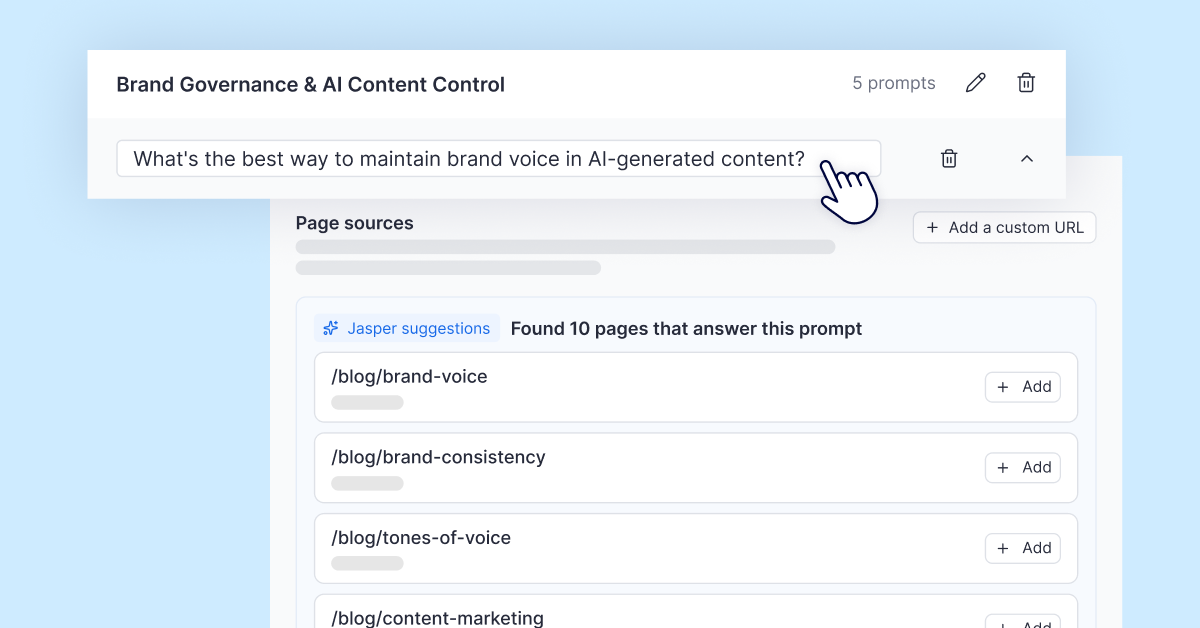
Connect prompts to relevant pages. Jasper suggests relevant URLs for the prompts in your analysis. Review those connections, remove pages that don’t fit, or add a custom URL when a page you need is missing. Your team gets a clear view of which content relates to each question you track, and where optimization work should begin.
Measure the pattern, not a single answer. AI platforms often give different answers to the same question, so a single response can skew your results. GEO Hub now runs each prompt five times per AI provider on every scheduled run. Brand presence, citation rate, sentiment, and your overall GEO score are calculated across all five responses, and you can open any prompt in the topic clusters section to see each one.
Get more analysis without spending more credits. As Jasper discovers more content, your page count can grow. Page analysis will no longer consume credits, so discovering additional pages won't add to your analysis charges.
How Can Teams Put These GEO Enhancements to Work?
The biggest win isn’t more data. It’s data your team can trust, connected to the content it can change.
With more reliable measurement and a clear link between buyer questions and pages, every round of GEO optimization starts from a sharper picture. Teams spend less time assembling an analysis and more time improving the content that matters.
Here’s how teams are putting the new GEO Hub to work.
- Report visibility with confidence. Share AI search metrics built on five samples per provider, so leadership sees a stable trend, not a one-off answer.
- Focus on a product line or region. Scope your analysis to the relevant directory or subdomain, then connect those pages to the buyer questions you want to track.
- Keep new content in view. Include your blog or resource center in your scope so Jasper can discover newly published content after the analysis is set up.
- Bring external brand pages into the analysis. Add the profiles and listings your team manages alongside your own website.
- Give optimization work a clearer target. Review the pages associated with a priority prompt before deciding what to update. Your team can focus on content relevant to that question and follow visibility changes over time.
Frequently Asked Questions (FAQ)
Do I need to update my existing analyses?
No. Existing analyses continue without changes, and increased prompt sampling applies automatically the next time each analysis refreshes. Historical results stay as they were. Update an analysis’s settings if you want to adjust the scope, add external pages, or connect pages to prompts.
Can Jasper map pages in an existing analysis?
Yes. In settings, the Unmapped pages section includes an Automap option that attempts to match your existing pages to relevant prompts. Review the suggestions and adjust them as needed, or map pages manually. Saving changes reruns the analysis and uses credits for the selected prompts and AI providers.
Does mapping pages to prompts change my GEO scores?
No. Mapping clarifies which content relates to each prompt; it doesn't change the prompts that determine your GEO scores. It helps your team understand where to focus content work and follow related visibility changes.
What if Jasper doesn't suggest the page I need?
You can add a custom URL next to the relevant prompt. Page mapping is optional and can also be completed later.
How do I get started?
These enhancements are available now. Create a new analysis to use the updated setup flow, or open an existing analysis’s settings to refine its scope and connect pages to prompts.
Pro tip: Start with the segment of your business you want to improve AI visibility for. Define the relevant content, review the prompts, and check the suggested page connections. That gives your team a focused starting point for its next round of optimization.
Jump into Jasper to start improving your GEO, explore the Success Center for detailed guidance, or book a demo with our team to see it in action.

More of the latest & greatest

What the 2026 State of AI in Marketing Data Means for Financial Services
Jasper's latest research reveals what financial services marketers need to scale AI execution while maintaining the governance and oversight their industry demands.
October 9, 2026
|
Jessica Kennedy

Optimizing Product Content for AI Search Engine Recommendations
Discover how to build product content that AI shopping engines can accurately understand and consistently recommend.
October 8, 2026
|
Mason Johnson

How to Measure AI Referral Traffic and Find Competitive Visibility Gaps
Discover how to connect AI referral traffic with competitive share of voice, prompt-level gaps, and a prioritized GEO optimization roadmap.
October 8, 2026
|
Kurt Lambert