





.png)
Mason Johnson
October 15, 2026
Introducing Multiple Audiences: Write for the Whole Buying Committee
Craft content that resonates with multiple target audiences simultaneously with Jasper Multiple Audiences. Attach up to four audiences to one AI generation, so a single asset reaches the whole buying committee.

Write for the Whole Buying Committee, Not Just One Seat at the Table
Key takeaways
- Jasper Multiple Audiences lets marketers attach up to four audiences to a single AI generation: one primary audience that sets the framing and up to three secondary audiences the content also needs to reach.
- Jasper writes to the primary audience and finds common ground with the others, so one asset can speak to an entire buying committee without diluting the message.
- Modular audiences replace hard-to-maintain composite personas. Each audience is defined once and combined as needed. For example, three audiences cover twelve combinations.
Most marketing teams have already done the audience work. The personas are researched, the ICP is documented, the buying group is mapped. But persona docs were built for people. A writer reads the deck once, carries every persona in their head, and blends them for each asset.
AI can't do that. It only knows what you hand it, and a persona doc doesn't tell it who should lead, where audiences overlap, or what to drop when they conflict.
So teams pick one persona and miss everyone else, or merge several into a composite profile that's hard to maintain and blurry for everyone. That's expensive when one asset reaches the exec who owns the budget, the ops lead who owns the workflow, and the practitioner running the evaluation.
Multiple Audiences in Jasper changes that. Every audience in Jasper IQ is now a modular building block you define once and combine for any asset. Here's how it works.
How Does Multiple Audiences Work?
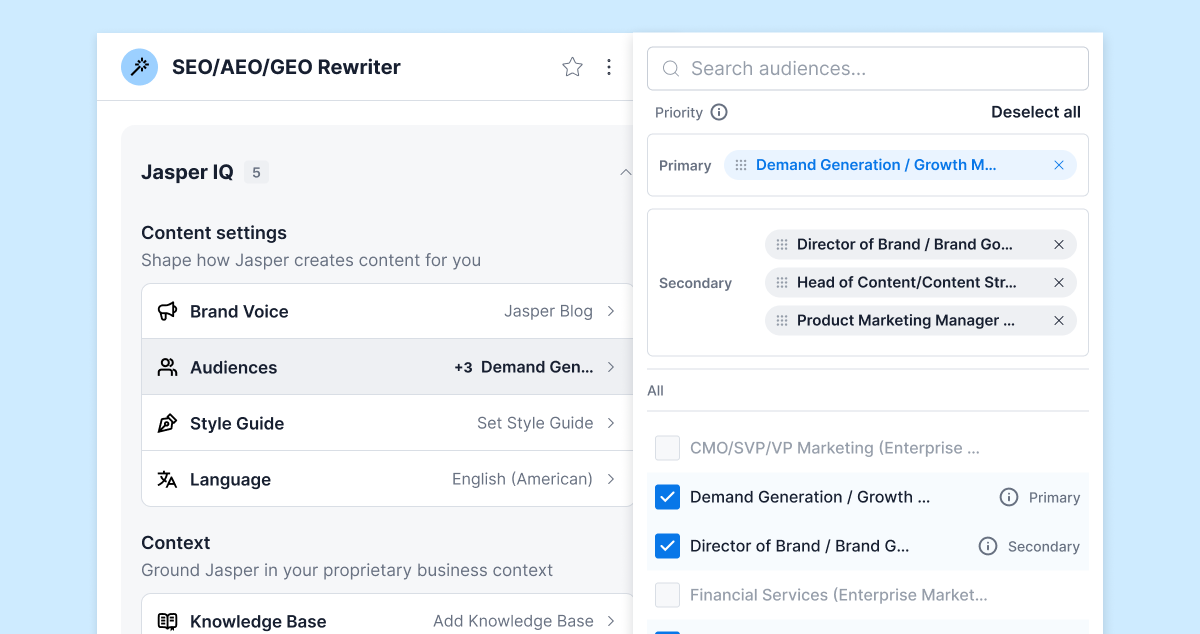
Your audience knowledge, shaped for AI. Instead of one persona doc attached to a prompt, Jasper gives AI a clear hierarchy: who the piece is for first, who else needs to buy in, and how to weigh them. That structure is what lets AI do the blending a skilled writer used to do in their head.
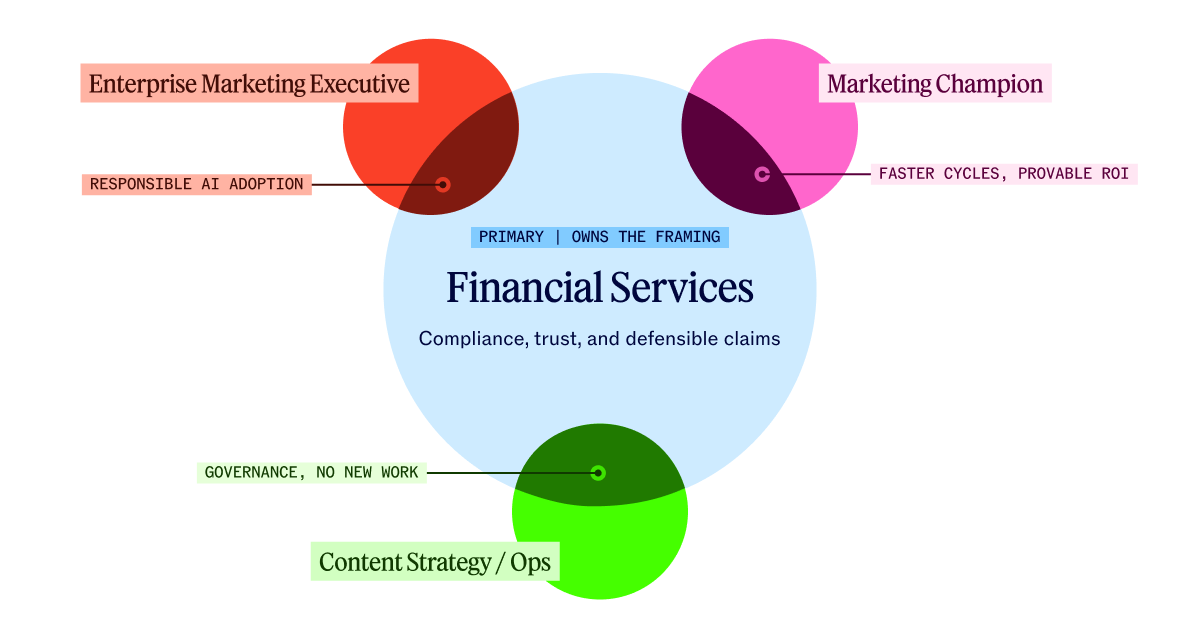
Pick a primary audience. Add up to three secondaries. The primary audience owns the framing, structure, and emphasis, so the piece still reads as if it were written for them first. Add up to three secondary audiences and Jasper finds where each one overlaps with the primary, like a shared buying trigger, a common success metric, or an angle they both care about. The result is one asset where the exec, the ops lead, and the practitioner each find their reason to say yes, without messaging watered down to fit everyone.
Available wherever your team creates. Multiple Audiences works everywhere Audiences already do: Agents, Chat, Canvas, Grid, the Jasper API, and Jasper MCP. The same modular library powers every surface, so your audience strategy stays consistent no matter who's generating or where.
Rewrite in minutes. Open any Canvas document, choose Rewrite with new Audience(s), and Jasper creates a new version beside the original. Only the audience-driven changes happen, so structure and examples stay intact and you can see exactly what moved for the new reader..
Less setup, smarter defaults. Auto IQ now recommends a full audience lineup, primary plus secondaries, instead of a single audience. Teams that write to the same committee every week can save that lineup as a workspace default.
Built for your integrations, too. Every API endpoint that accepts audienceId now also accepts audienceIds. Existing calls keep working exactly as before.
How Do Jasper Customers Use Multiple Audiences?
The biggest win isn't selecting more audiences. It's building an audience library designed for how AI creates.
When each audience describes one specific group of people, a small library goes a long way. Teams define their verticals, roles, and personas once, then combine them for whatever the campaign, deal, or channel calls for. The library stays easy to maintain, and every new audience makes every existing one more useful.
Here's how customers are putting Multiple Audiences to work.
- Break composites into modular audiences. "FinServ CMO & ops buyer" becomes three audiences: the vertical, the executive, and the ops lead. One composite covers one scenario. Three modular audiences cover twelve, and each stays sharp because it only describes one group of people.
- Lead with the vertical, layer in the roles. The strongest combinations put an industry or region in the primary slot, then add titles and personas as secondaries. Every layer adds nuance because they're all slices of the same buyers.
- Keep pace with the deal. When a new decision-maker joins, add them as a secondary and rewrite the existing asset. The account team gets content for the new stakeholder the same day, without starting from scratch.
- Grow the library as campaigns demand it. Because each audience stands on its own, adding a new region or splitting a persona by seniority never means redoing the rest. The most successful teams start with a vertical and a few personas, then add layers as they go.
Frequently Asked Questions (FAQ)
How do I choose a primary audience?
Make the audience tied to the asset's main goal the primary, then add the people whose buy-in you also need as secondaries. Secondary audiences have no ranking among themselves.
What happens when audiences conflict?
Jasper looks for common ground first and builds the content there. When a secondary audience conflicts with the primary and no common ground exists, Jasper favors the primary rather than diluting the message.
How many audiences can I use in one generation?
Business and Enterprise workspaces can attach up to four audiences per generation: one primary and up to three secondary. Pro workspaces can attach up to three: one primary and up to two secondary.
How do I get started?
Multiple Audiences is available now on every Jasper plan that includes Audiences. Single-audience generations, existing content, and existing API calls work exactly as they did before.
Jump into Jasper to start using Multiple Audiences, explore the Success Center for detailed guidance, or book a demo with our team to see it in action.

More of the latest & greatest

How to Audit and Analyze AI Crawler Traffic on Your Website
AI crawlers are changing how content gets discovered and surfaced in AI search. Understanding their behavior gives marketers greater visibility into how AI engines interact with their websites.
October 14, 2026
|
Kurt Lambert

Enterprise GEO Platforms: Evaluation Criteria for Marketing Teams
The right enterprise GEO platform connects AI search visibility insights to content optimization, with the measurement and governance capabilities needed to scale.
October 14, 2026
|
Mason Johnson
.png)
How to Track Brand Citations and Share of Voice Across ChatGPT, Gemini, and Perplexity
Understand where your brand stands in AI search with a closer look at citation performance, competitive share of voice, and the content opportunities shaping visibility across ChatGPT, Gemini, and Perplexity.
October 14, 2026
|
Mason Johnson